
A practical guide to working with AI coding agents without the hype.
Software development in the real world is messy. Requirements change, edge cases pile up, and code lives far longer than anyone expects. That’s exactly where AI coding agents are starting to show up, not in demos, but in everyday development work.
This isn’t about AI magically writing all your code for you, and it’s not aimed at managers chasing headcount reductions. It’s for developers who already ship software and want to understand how AI agents actually fit into real workflows, without sacrificing quality, security, or long-term maintainability.
The focus here is on how to work with these tools day to day and where human judgment still matters.
The “AI will replace developers” framing is the wrong conversation. AI won’t eliminate developers; it will widen the gap between teams that know how to use AI well and those that don’t. The teams that win won’t be the ones writing the most code, but the ones delivering reliable, trustworthy software while using AI responsibly.
AI can absolutely boost productivity, I’ve seen it firsthand, but AI may write the code, while developers remain responsible for its behavior. That responsibility doesn’t disappear.
By the end, you will have a grounded way to treat AI agents as valuable collaborators without falling into over-trust or over-hype.
What do We Mean by “AI Coding Agents”?
Before going further, it helps to be precise about what we mean by AI coding agents, because not every AI-assisted coding experience is agentic, even when powered by the same underlying models.
A helpful way to think about today’s tools is by how they’re used, not by brand name.
One standard interaction mode is inline autocomplete. Here, AI suggests code as you type, completing lines, functions, or small blocks. Tools like GitHub Copilot or CodeWhisperer were initially best known for this style. It’s fast and convenient, but fundamentally reactive: the AI responds to your cursor and local context. It doesn’t reason about goals, plan changes, or take initiative across a codebase.
Another mode is chat-based assistance. In this case, you interact with an AI through conversation, asking questions, debugging issues, or requesting snippets. Models like Claude, Codex, or GPT are often used this way, whether via web interfaces, IDE chat panels, or CLIs. Chat enables deeper reasoning, but developers still have to apply changes and coordinate work themselves.
When we talk about AI coding agents, we mean something beyond both of these modes. Agents are defined less by the model they use and more by their behavior. They take a goal, form a plan, and execute multiple steps toward it. They can read and modify files, reason across a codebase, run tests, and sometimes open commits or pull requests, all with minimal prompting.
In other words, the same model might power autocomplete, chat, or an agent; the difference is autonomy and orchestration.
A simple way to think about it:
- Autocomplete helps you write code faster
- Chat enables you to think through problems
- Agents help you do work end-to-end
That autonomy is powerful, but it changes the risk profile. Agents excel at mechanical, well-defined tasks, refactoring, boilerplate, test generation, and codebase exploration. They struggle when requirements are ambiguous, domain knowledge is implicit, or architectural judgment is required. An agent won’t question whether something is a good idea unless you explicitly ask them.
That’s why working effectively with agents isn’t about choosing the “best” model. It’s about knowing what to delegate and what you must still own as a developer.
The Mental Model Shift: From “Ask & Paste” to “Direct & Verify”
The most significant change when working with AI coding agents isn’t technical; it’s mental.
Many developers start by treating AI like a smarter Stack Overflow: ask a question, paste the answer, move on. That works for small snippets, but it breaks down with agents. Agentic tools don’t just answer questions; they take action.
Keeping an “ask & paste” mindset leads to underuse at best and broken code at worst. A better model is direct & verifiable.
Think of an AI agent like a swift junior developer. You give it intent and constraints, let it execute, then review the result carefully. The agent provides execution speed; you provide judgment. That division of labour is the whole point.
This shift matters because agents are literal and optimistic. They do what they think you asked, not what you meant. They won’t question assumptions or notice missing context unless you force them to.
The output often looks polished while hiding subtle mistakes. That’s why verification is non-negotiable.
Treat AI-written code as suspect until proven correct. Review it more closely than human-written code, focusing on edge cases, error handling, security, and architectural fit. Fluency can be misleading.
Used this way, agents offer real leverage without delusion. They amplify execution, not thinking. Your role doesn’t disappear; it moves upstream into intent, constraints, and review. That’s the mental shift that makes AI coding agents worthwhile.
A Baseline AI Coding Workflow
Once you adopt the direct & verify mindset, the next question is practical: what does an AI-assisted coding workflow actually look like?
A simple, durable loop that works well in practice is:
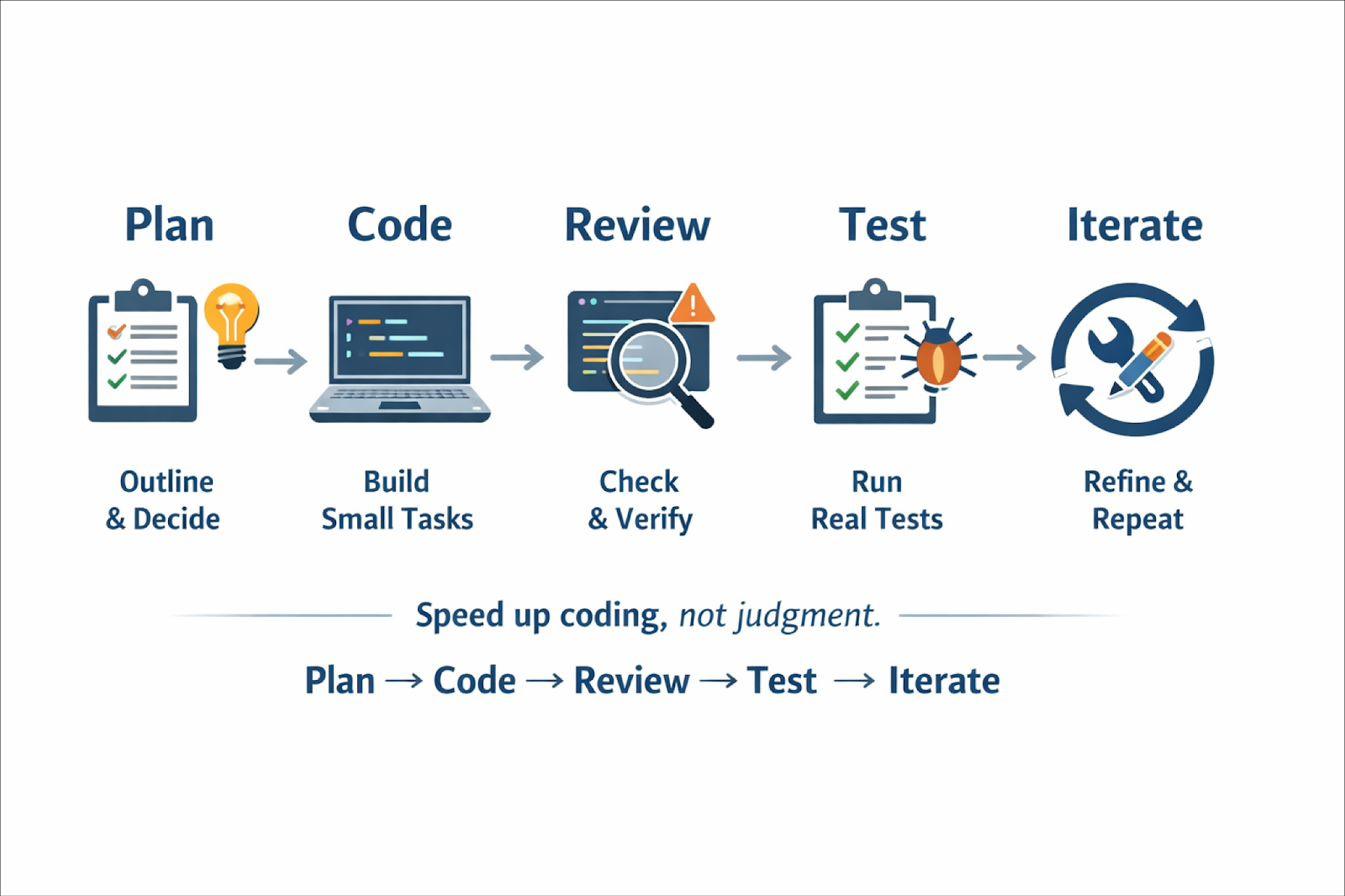
This isn’t new; it’s just a standard development loop. The difference is that AI agents dramatically accelerate some stages, which makes skipping others tempting. Don’t. The fastest way to get into trouble with agents is to collapse the loop into “prompt to ship.”
Plan
Planning is the most skipped and most crucial step. Before generating code, be clear on what should change and why. This doesn’t require a long spec; a short outline is enough. Use AI to clarify requirements or surface edge cases, but make the decisions yourself. If you can’t explain the plan, the agent won’t execute it reliably.
Code
This is where agents excel. With a clear plan, delegate small, well-scoped tasks. Avoid “build the whole feature” prompts. Hand off discrete work: one refactor, one endpoint, one file set, so results are easy to review and fix.
Review
AI code needs more scrutiny, not less. Review it like a risky PR: correctness, assumptions, error handling, security, and architectural fit. Fluent code can still be wrong.
Test
This is where many AI workflows break. Agents can help write tests, but they often miss edge cases or optimise for passing tests. Run real tests, expand coverage, and trust the test suite over the agent’s confidence.
Iterate
The real win is cheap iteration. Refine prompts, rerun tasks, and improve incrementally. Quality emerges through repetition, not one-shot generation.
Planning With AI (Before Any Code Is Written)
If I could spotlight one habit that makes or breaks an AI coding session, it’s this: do not skip the planning phase.
When developers complain that “AI wrote bad code,” what usually happens is that they jump straight into generation without clarifying intent. Agents are extremely good at executing instructions, but terrible at guessing what you meant.
If you don’t slow down to define the problem and the approach, the AI will happily fill in the gaps for you, often in ways you didn’t intend.
When I say planning, I don’t mean a heavyweight design doc (though sometimes that’s appropriate). I mean taking a few minutes before writing code to clarify what needs to be done, identify pitfalls, and agree on an approach. The key difference now is that you can use AI itself to help with this planning.
Think of the planning stage as a collaboration between you and the AI to figure out what should be built before worrying about how to build it.
A helpful rule of thumb I’ve learned the hard way: if you can’t explain the plan clearly, the agent can’t execute it reliably.
How AI Helps in the Planning Phase
One of the most practical uses of AI in planning is clarifying requirements. You can ask the AI to restate or refine what needs to change. For example:
“I need to add Google login to this app. Here’s how sign-up works now. Can you outline what needs to change?”
A good AI will respond with concrete items: OAuth setup, callback endpoints, user model changes, token handling, and edge cases. Sometimes it will even ask follow-up questions, which is a good sign. That means you’re uncovering ambiguity before writing code instead of after.
AI is also surprisingly effective at surfacing edge cases. You can explicitly ask:
“What edge cases or failure scenarios should I think about for this feature?”
For something like payments or uploads, it often lists scenarios you might overlook: partial failures, retries, external API downtime, and validation gaps. Identifying these early lets you design for them instead of patching them later.
Another pattern I rely on heavily is asking AI to propose an approach before coding.
“Given this existing structure, how would you implement feature X?”
I don’t blindly accept the answer; I treat it as a sanity check. If the proposal sounds reasonable, great. If it’s wildly over-engineered or misses the point, that’s a signal I need to clarify requirements. Catching that during planning saves a lot of cleanup.
For larger tasks, I often ask the AI to help with file-level planning:
“Which files or components would need to be created or modified to implement this?”
Even a rough list is valuable. It acts like a checklist and helps ensure you don’t forget config changes, migrations, or documentation.
Planning Tools That Formalize This Step
Beyond ad-hoc chat, there are now tools that explicitly formalize planning as a first-class step.
One notable example is Traycer, which leans into spec-driven development. You give Traycer a high-level task or intent, and it produces a structured plan, often broken into phases, with reasoning and diagrams. That plan becomes the guide for execution. Coding agents (Cursor, Claude Code, Cline, etc.) then work against that spec, and Traycer can later verify whether the implementation actually followed it.
The core idea is simple but powerful: agents drift. They hallucinate APIs, misread intent, or break existing behaviour. A written plan acts as a contract. Instead of “vibecoding” through prompts, you anchor the work to an agreed-upon blueprint.
Even general-purpose agents have converged on this idea. Claude Code and Cursor, for example, allow you to switch to plan modes where you describe what you want, review the plan it proposes, iterate on that plan, then let it generate code.

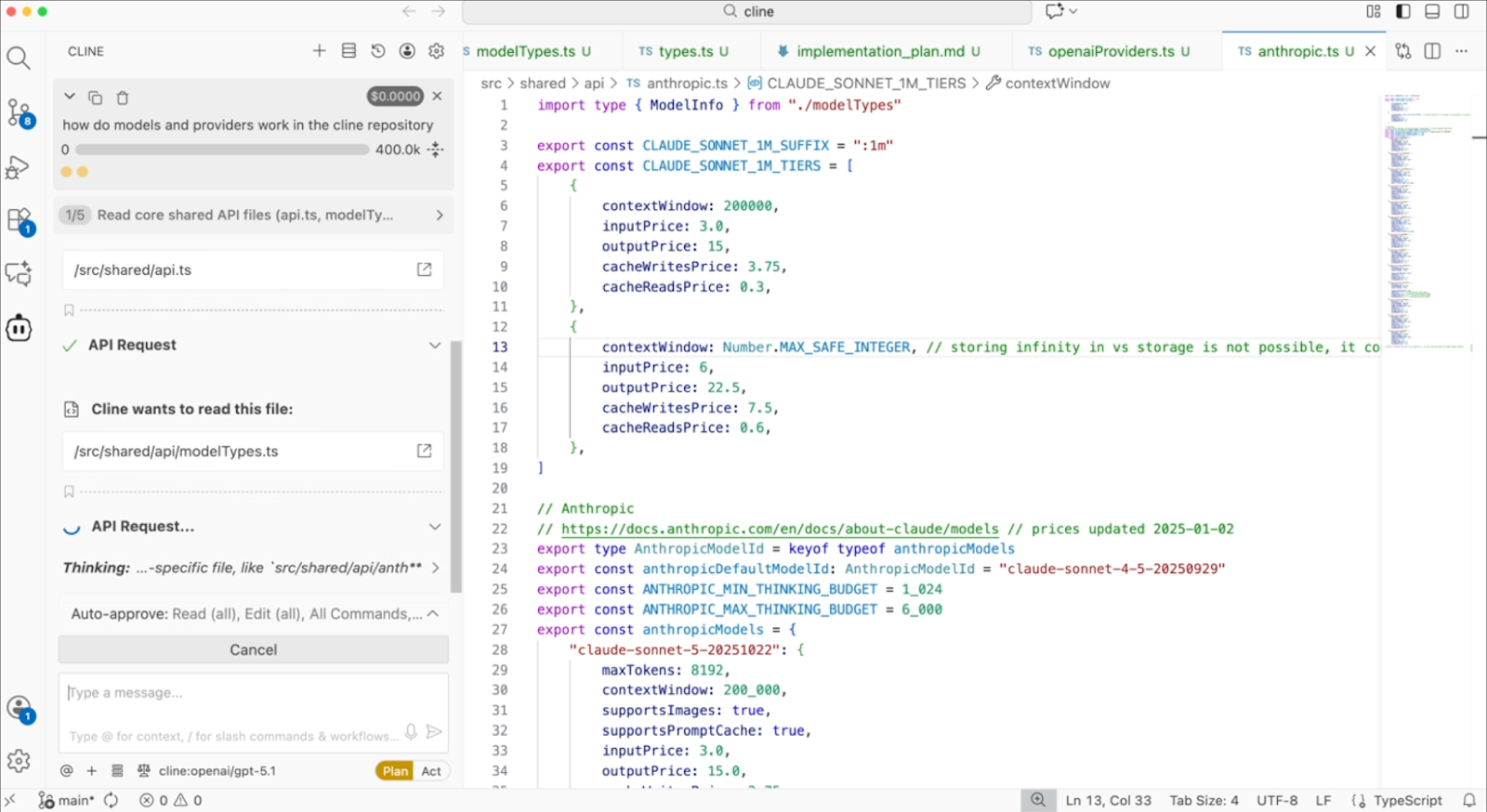
Similarly, Cline explicitly separates planning and execution. In Plan Mode, it analyzes your codebase and proposes a step-by-step strategy.

Only after you approve does it switch to Act Mode and start making changes. This mirrors how an experienced engineer would approach a refactor, understand the system first, then type.

Avoiding Over-Planning
The goal isn’t a 10-page spec for a 10-line change. It’s shared clarity. Sometimes my entire plan is a short list. That’s enough. It gives the agent structure and keeps me honest.
During planning, avoid overly narrow questions that lock it into one solution too early. Instead of “Should I use a factory pattern here?”, ask:
“What are some reasonable ways to design this component, given the current code?”
Let the AI lay out options. You decide.
Delegating Code Generation Without Losing Control
Now we get to the coding itself, the step where you delegate actual code writing to an AI agent. This is where things start to feel magical, and where things can go wrong if you’re careless.
Modern agentic tools go far beyond autocomplete. They can generate entire files, refactor code across a project, run shell commands, and execute tests. Used well, they feel like working with a swift junior developer: you describe what needs to be done, and the agent figures out how to do it.
But that power only works if you delegate properly.
Avoid prompts like “build the entire feature.” They produce huge diffs that are hard to review and often inconsistent. Instead, break work into focused steps aligned with your plan.
For example, platforms like Orchids let you scope work by describing discrete parts of a feature like “add authentication to this app” or “create this UI component”, which aligns with treating an agent as a collaborator rather than a black-box code machine. Simply Chat with the agent (/features/orchids-agent) to make changes, add features, and fix bugs in your project.

Using Agentic Tools in Practice
Tools like Claude Code make delegation very literal. Because it runs in your terminal and can edit files, run commands, and create commits, it feels like handing work to a real collaborator. That also means you need to be explicit, treat it like a junior developer with broad access.
Cursor offers more granular control. You can use it lightly for inline suggestions or targeted edits, or let its agent mode generate larger, multi-file changes. The key advantage is flexibility: you decide how much autonomy to grant based on the task at hand.
Cline shines for larger, codebase-wide changes. It’s powerful at refactoring and migrations because it understands how files relate to each other. But if you give it vague instructions, it will touch far more than you expect. That’s not a flaw, it’s a reminder to scope carefully.
Across all these tools, the pattern is the same: clear boundaries beat clever prompts.
Anchor the Agent to a Plan
If you did the planning step, use it.
One effective technique is to anchor the agent to a pre-approved plan explicitly:
“Based on the plan above, implement step 1 only.”
Sometimes I include the plan as a checklist and ask the agent to tackle just the first item. This dramatically reduces drift and makes it easy to adjust between steps. Tools that support plan/act cycles make this even easier; you actually review the plan before approving it.
Why Incremental Delegation Works
Delegating incrementally gives you leverage without lock-in. After each step, you can review the diff, catch misunderstandings early, and adjust the plan if needed. If you ask for everything at once, you lose that flexibility and often end up redoing work.
I learned this the hard way after asking an agent to “optimize performance” and getting a massive, unfocused diff. Now I scope work precisely. The results are far better.
Know When Not to Delegate
Not everything should be handed to an agent. Trivial changes are often faster to do manually. Deeply domain-specific logic can take more time to explain than to write yourself. That’s not failure, it’s pragmatism.
Hybrid approaches work well too: write pseudocode and let the agent flesh it out, or start a function and let autocomplete finish once the pattern is clear.
Reviewing Agent Output Like a Professional (Not a Passenger)
So the AI wrote some code for you, great. Now comes the part that actually determines whether this helps or hurts your project: reviewing it properly.
Here’s the counterintuitive truth: AI-written code needs more review, not less. Not because it’s always bad, often it’s impressively clean, but because you can’t assume intent, context, or judgment the way you can with a human teammate. You have to verify.
What I Actually Look For When Reviewing AI Code
I tend to review AI-generated code in a deliberate order:
Correctness first.
Does the code actually do what was requested?. Half-implemented features and missing edge paths are common failure modes.
Data flow and architecture.
AI sometimes introduces unnecessary indirection, extra queries, or awkward state handling. Look for inefficiencies or architectural drift, especially in hot paths.
Error handling.
This is a classic weak spot. Check what happens when things fail, external APIs, file uploads, and database calls. AI often assumes the happy path unless explicitly told otherwise.
Security and validation.
Never assume the AI “handled security.” Check input validation, authorization boundaries, file size/type limits, query safety, and dependency changes. This is non-negotiable.
Performance implications.
AI won’t naturally think in Big-O or production load. Watch for N+1 queries, repeated work in loops, or expensive operations in request paths.
Standards and completeness.
Did it follow project conventions? Update all call sites? Add tests? Touch docs or configs if needed? AI often gets the core logic right but forgets the edges.
Using AI to Help You Review (Without Giving Up Control)
This is where AI-assisted code review tools start to shine.
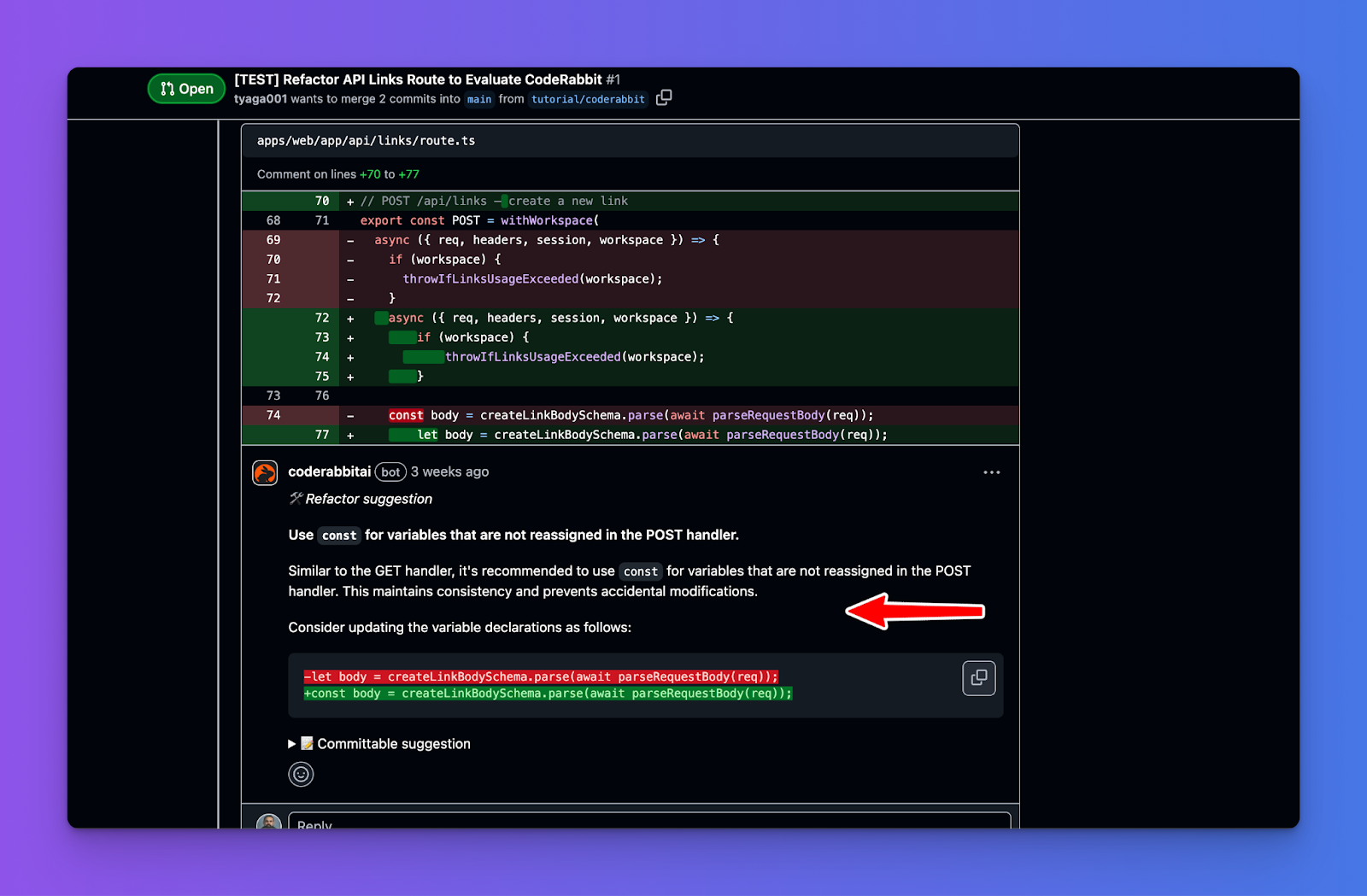
Tools like CodeRabbit act as AI code reviewers within your IDE or PR workflow. They scan diffs and add inline comments pointing out potential bugs, logic issues, missing tests, style inconsistencies, or risky patterns, very much like a senior engineer annotating your code. The big win here is early feedback: you catch issues before opening a PR, reducing back-and-forth later.
Other tools like Devin Review focus on comprehension, not just linting. Instead of dumping raw diffs, Devin reorganizes changes into a logical narrative, grouping related hunks, ordering them meaningfully, and explaining why changes exist. For large AI-generated PRs, this is huge. It turns “overwhelming diff” into something a human can reason about quickly.
These tools don’t replace your judgment; they amplify it. They surface risks, highlight suspicious areas, and help you focus attention where it matters most.
Reviewer + Coding Agent
One of the most interesting shifts is how AI reviewers and AI agents work together. Tools like Graphite, CodeRabbit, Devin Review, Cursor Bugbot, Snyk Code, DeepSource, Codacy, among others, don’t just surface potential issues; they explain changes, group related hunks, highlight bugs, enforce standards, and in some cases, offer commitable suggestions.
We’re also seeing multi-agent review patterns emerge. Each agent reviews the same diff from a different lens. The result is coverage that would typically require several senior engineers, without scheduling overhead.
A Final Reality Check
AI is highly confident. It won’t leave TODOs or say “I’m not sure.” That means you must inject doubt during review. If something looks plausible but touches sensitive logic, crypto, auth, money, or concurrency, test it aggressively.
Testing - Where Most AI Workflows Quietly Break
Testing is the stage where AI-assisted development most often falls apart, not because agents can’t write code, but because verification doesn’t scale as easily as generation.
By the time you reach testing, the code exists, and it looks reasonable. The agent is confident. You’re tempted to run one happy-path check and move on. That’s precisely the failure mode: AI is optimistic by default, and humans get complacent when the output reads fluently.
The fix is a mindset shift: trust tests, not confidence.
AI can help a lot here, but only as a partner, not as the final judge:
- Generate test cases (especially edge cases). Ask for unit tests that include weird inputs, nulls, timeouts, invalid states, large payloads, race conditions, and whatever “failure” means in your domain. This is one of the best uses of AI because it brute-forces scenarios you might miss.
- Use AI to debug failing tests faster. Paste the failure + relevant code and ask what’s likely going wrong. It’s like a rubber duck that can actually propose hypotheses.
But here’s the critical warning most people learn the hard way:
Don’t let agents “fix” tests automatically without supervision
I’ve seen agents happily change code to make a test pass rather than question whether the test expectation is wrong.
Example: a test expects output "42", but the correct logic should yield "43". A human reviewer might say, “the test is wrong,fix the test.” An agent might instead “repair” the code to return "42" because its objective is to satisfy the failing assertion even if that silently breaks the real requirement.
This is basically overfitting to tests. It’s especially risky when:
- The requirement is ambiguous,
- The test was written quickly (or auto-generated),
- or the agent is running in “auto-fix CI failures” mode.
So when an agent proposes a fix for a failing test, your job is to ask:
- Is the test asserting the right thing?
- Is this change aligned with the requirement, or is it just satisfying the assertion?
- Did we just “game” the test suite?
Bottom line, AI helps you ship faster, but testing is where you deliberately slow down. Use AI to expand coverage and speed up diagnosis while keeping a human hand on the wheel.
Multi-Agent Workflows (When One Agent Isn’t Enough)
Up to now, I’ve mostly talked about “the agent” as if you’re working with a single AI helper. In reality, one of the more powerful and misunderstood developments is multi-agent workflows, where several agents work together with distinct roles.
The temptation is obvious: if one agent is good, surely three or four must be better. In practice, that’s often not true.
A well-prompted single agent can handle far more than most people expect.
So the right question isn’t “Can I use multiple agents?”
It’s “What constraint am I solving that a single agent can’t?”
In real-world usage, there are three situations in which multi-agent setups consistently outperform single-agent setups.
Context Protection (Avoiding Context Pollution)
Large language models have finite context windows, and response quality degrades as irrelevant information accumulates. This is known as context pollution.
Context pollution happens when an agent must carry information from one subtask that is mainly irrelevant to the next. As the context grows, the model’s ability to reason about the actual problem weakens.
A classic example is a customer support agent.
Imagine an agent diagnosing a technical issue that also requires retrieving order history. If every order lookup injects thousands of tokens, purchase history, shipping details, and metadata, the agent now has to reason about a technical problem while holding a lot of irrelevant information in its context.
At this point, the agent is reasoning with thousands of tokens that don’t meaningfully contribute to solving the technical issue. Attention is diluted, and output quality suffers. This can be solved using context isolation.
Multi-Agent Approach (Context Isolation)
Here is an example of how this can be done in Claude. Consider an integration system in which agents need to work across multiple CRMs. Splitting work into specialized agents with focused tools and prompts dramatically improves accuracy and reliability.
from anthropic import Anthropic

client = Anthropic()

# Specialized agents with focused toolsets and tailored prompts
class CRMAgent:
    """Handles customer relationship management operations"""
    system_prompt = """You are a CRM specialist. You manage contacts,
    opportunities, and account records. Always verify record ownership
    before updates and maintain data integrity across related records."""
    tools = [
        crm_get_contacts,
        crm_create_opportunity,
        # 8-10 CRM-specific tools
    ]

class MarketingAgent:
    """Handles marketing automation operations"""
    system_prompt = """You are a marketing automation specialist. You
    manage campaigns, lead scoring, and email sequences. Prioritize
    data hygiene and respect contact preferences."""
    tools = [
        marketing_get_campaigns,
        marketing_create_lead,
        # 8-10 marketing-specific tools
    ]

class OrchestratorAgent:
    """Routes requests to specialized agents"""
    def execute(self, user_request: str):
        response = client.messages.create(
            model="claude-sonnet-4-5",
            max_tokens=1024,
            system="""You coordinate platform integrations. Route requests to the appropriate specialist:
- CRM: Contact records, opportunities, accounts, sales pipeline
- Marketing: Campaigns, lead nurturing, email sequences, scoring
- Messaging: Notifications, alerts, team communication""",
            messages=[
                {"role": "user", "content": user_request}
            ],
            tools=[delegate_to_crm, delegate_to_marketing, delegate_to_messaging]
        )
        return response
Context isolation works best when:
- Subtasks generate large volumes of context (1k+ tokens)
- Most of that context is irrelevant downstream
- The subtask has clear criteria for what information to extract
- The task is lookup-, retrieval-, or filtering-heavy
If subtasks are tightly coupled, splitting them usually makes things worse, not better.
Parallelization (Coverage Over Speed)
The second case where multi-agent systems shine is parallel exploration.
Running multiple agents in parallel allows you to explore a larger search space than a single agent can cover. This is especially effective for research-heavy tasks, where different aspects of a question can be investigated independently.
A lead agent decomposes the problem into facets, spawns subagents to explore each one in parallel, then synthesizes the results.
Each subagent operates in its own clean context, investigates one angle, and returns distilled findings. The lead agent then combines them into a coherent answer.
This approach improves thoroughness, not raw speed.
In fact, multi-agent systems typically consume 3–10× more tokens than a single-agent approach for equivalent tasks. Each agent needs its own context, coordination messages add overhead, and results must be summarized across boundaries.
Parallelization is worth it when:
- The task naturally decomposes into independent facets
- Coverage and completeness matter more than cost
- Each subtask can be explored without shared state
It is not a good fit for tightly coupled logic or incremental code changes.
Multi-agent workflows are not a default pattern. They earn their keep only when they solve concrete problems that single agents struggle with, most notably context pollution and parallel exploration.
Conclusion
To wrap up, the future of AI coding looks like one where routine tasks fade into the background, and the developer’s job is elevated to more creative, integrative, and supervisory tasks. AI agents become an invisible workforce threaded through our tools and processes. However, that doesn't diminish the importance of human developers – quite the opposite.
We’ll rely on human insight to define problems correctly, ensure systems are safe and effective, and innovate beyond the recombination of existing patterns (which is what AI does). The developers who thrive will be those who embrace these tools to amplify their impact, much as great engineers have embraced automation in other fields.
