AD
Episode
458
Interview
Web News

Can I Learn React Using the Official Documentation?

Recorded:
February 25, 2026
Released:
March 10, 2026
Episode Number:
458

A lot of developers say you should learn a framework from its official documentation - but is that actually a good way to learn React when you’re still a beginner? In this episode, Matt breaks down his experience working through the official React docs, including the Quick Start guide, the Tic-Tac-Toe tutorial, and the “Thinking in React” section. Along the way, he talks about where React starts to click, where the docs shine for beginners, and why understanding project structure, state, and component hierarchy matters so much when you’re trying to move beyond vanilla JavaScript. In this episode Matt and Mike discuss whether the official React documentation is enough for beginners, how React’s learning materials compare to more guided tutorials, and what parts of the docs are especially helpful when you’re trying to build real understanding instead of just copying code.

Listen

Also available on...
...and many more, check your podcast app!

Who’s in This Episode?

Show Notes

  • The React documentation is broken down into 4 main areas including:
    • Learn
    • Reference
    • Community
    • Blog
  • In my beginner state, I focused on the Learn > Quick Start piece of the documentation

Getting Started

Quick Start Guide

  • Great resource for getting started
  • Really let's you see where JavaScript ends and React begins by including links to MDN on concepts JS beginners may find confusing
  • Has a great way of transitioning through increasingly more difficult but very relevant examples and methods - things that would be used on most websites (ie handling button clicks, storing basic data, displaying images, etc.)

Tutorial: Tic-Tac-Toe

  • Great that there are learning types taken into consideration here (learn by doing, or more of the theory route)
  • Love that you can do the tutorial in browser, but it also starts to mention your local dev environment to introduce you to the idea that this isn't all going to be done in the browser/just in text editors as vanilla code can be
  • Really like that they tell you where (which files) the code snippets are located - I never know where they want me adding coding in tutorials
  • Project structure is crucial in understanding what’s going on (at least for me) as I value being able to reach for the pieces of the project when I need them

Thinking in React

  • I think this part is super interesting because it’s almost acknowledging the “muscle memory” that you get when you work with a piece of technology for a long time
    • For example, I can almost “think in CSS layouts” when I’m looking at a UI, I can take it apart in my head the way that I would when I approach building it from scratch
  • The approach of this page:
    • Assume you have JSON API and mockup from designer
    • Breaking up the UI into components (in a hierarchy)
    • Building a static version that specifically does not have any interactivity (even though React is basically itching to… react)
    • Starting introducing interactivity through state - which we’ve recently learned
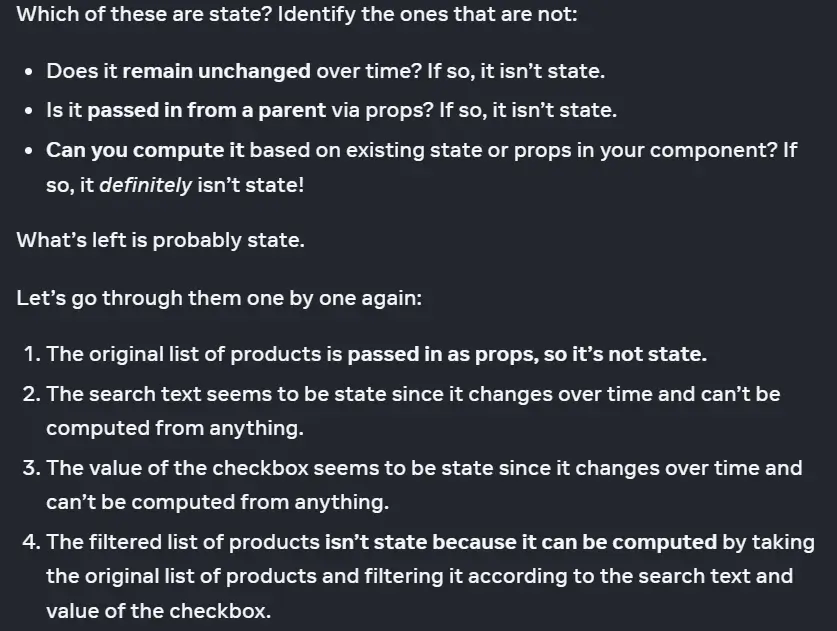
      • It also dives into the idea of state and how to use it properly including (see image)
  • Great tips that appear at critical moments (ie the props vs state deep dive)
  • Breaking down state in a full project, rather than just an isolated example
  • Data going the other way (up the hierarchy rather than down)

Reference

  • Great resource/refresher for those coming from another library/framework or returning to React after a long absence

Community

  • Links to places to discuss, learn, and get assistance